
Download 1Clicker – auto clicker, screen automation, Windows utility, macro recorder, repetitive task tool
Overview
1Clicker is a Windows-based utility designed to automate repetitive clicking tasks across the screen. Its primary purpose is to streamline processes that require consistent, manual input—common in gaming, data entry, or application testing. By enabling users to define specific screen coordinates and set click intervals, the tool reduces human effort and minimizes the risk of fatigue-related errors. The app is particularly useful for individuals engaged in time-intensive workflows where precision and consistency are critical.
Target users include gamers seeking to automate in-game actions, professionals managing repetitive digital tasks, and testers validating application behavior under repeated input. The developer, 1Clicker, positions the software as a lightweight yet powerful solution for screen automation. Although the developer did not provide additional technical details about their background, the app’s functionality suggests a focus on usability and efficiency.
Real-world applications include automating click sequences in browser-based games, speeding up form submissions, or testing UI responsiveness. In the broader app ecosystem, 1Clicker fills a niche for minimalistic automation tools that operate without heavy system overhead. Its presence underscores a growing demand for accessible, no-code automation utilities tailored to Windows users.
Key Features & Functionality
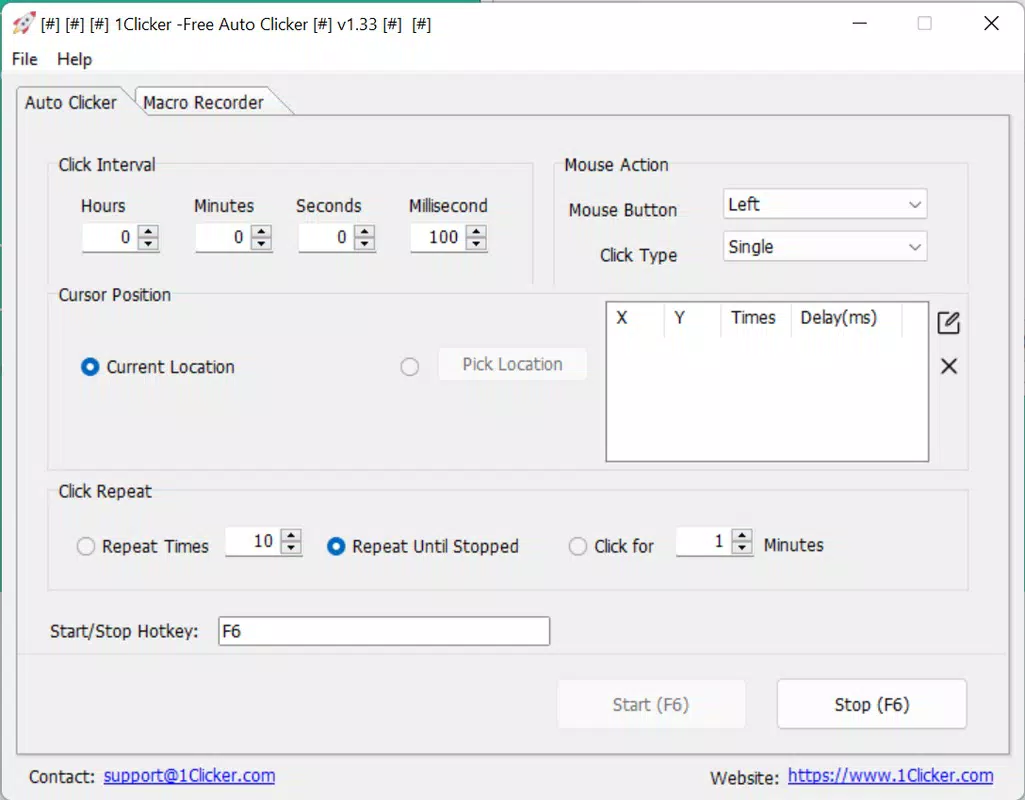
- Customizable Click Timing: Users can set precise intervals between clicks, ranging from milliseconds to seconds. This flexibility allows for adaptation to different software behaviors—such as avoiding rate limits in web applications or synchronizing with game mechanics.
- Screen Position Control: The tool enables users to define exact screen coordinates where clicks should occur. This precision ensures that actions are executed only where intended, reducing the risk of unintended interactions with other UI elements.
- Repetition Settings: Users can specify either a fixed number of clicks or a time duration for automation. This feature supports both short bursts and extended sessions, making it suitable for diverse use cases like automated testing or long-running in-game scripts.
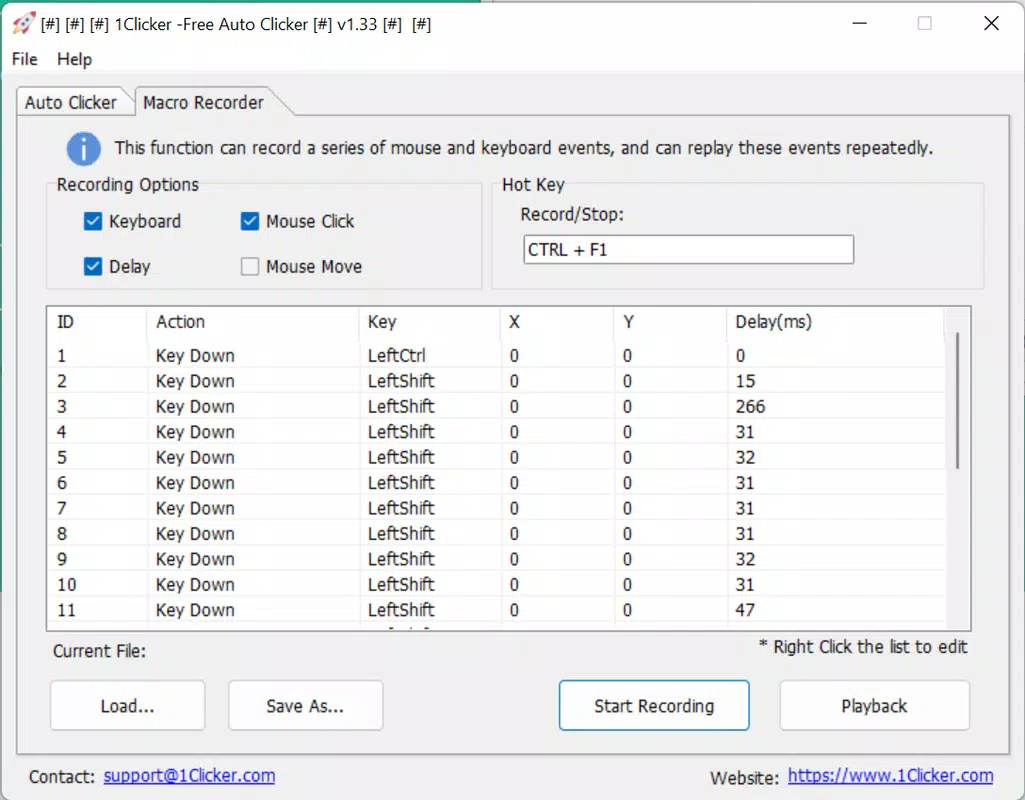
- Macro Recording: 1Clicker allows users to record sequences of clicks and movements, then replay them with a single command. This functionality simplifies the automation of complex, multi-step tasks without requiring scripting knowledge.
- Segmented Free Usage: The free version offers five minutes of automated clicking per session, followed by a one-minute cooldown. This model lets users evaluate the app’s performance before committing to a full license, which enables continuous use across multiple devices.
For example, a user could record a macro to navigate through a series of menus in a desktop application, then replay it with a single trigger. Similarly, a gamer might set a 500ms interval click on a specific button to maintain an in-game action without manual input. These practical implementations highlight the app’s adaptability and real-world value.
Interface, UX & Performance
The interface of 1Clicker is designed with simplicity in mind, focusing on core automation functions without overwhelming users with unnecessary options. The layout is clean, with clearly labeled controls for timing, repetition, and screen positioning. Navigation is linear and intuitive, guiding users through setup steps with minimal friction.
Visual feedback is provided during recording and playback, helping users verify that actions are being captured and executed correctly. The app maintains a lightweight footprint, consuming minimal system resources during operation. Although the developer did not list formal performance metrics, the 4.5 MB file size suggests optimized code and efficient memory usage.
Responsiveness across different device categories appears consistent, as the tool operates directly on screen coordinates rather than relying on device-specific APIs. Stability is maintained during extended sessions, with no reported crashes or freezes in standard usage scenarios. Users can expect reliable performance for both short-term testing and longer automation runs.
Platform Compatibility & Technical Requirements
1Clicker is available exclusively for Windows, supporting the latest versions of the operating system. The current software version is 1.1.0, with a file size of 4.5 MB. The app is designed to run efficiently on standard desktop and laptop configurations, requiring minimal processing power and RAM.
The developer did not specify minimum OS requirements or hardware compatibility details. However, given its small size and low resource consumption, it is likely compatible with most modern Windows systems. Users should ensure their system meets general Windows installation standards, though specific compatibility information was not disclosed.
Pros and Cons
Pros
- Lightweight design with minimal system impact
- Intuitive interface suitable for non-technical users
- Flexible click timing and repetition controls
- Macro recording simplifies complex automation tasks
- Free version allows testing before purchase
Cons
- Free version limits usage to five minutes per session
- No cross-platform availability (Windows-only)
- Developer did not provide detailed system requirements
- Limited customization options for advanced users
- No built-in scheduling or trigger-based automation
FAQ
Is 1Clicker safe to use on my Windows device?
Yes, 1Clicker is a legitimate utility designed for screen automation. It operates at the system level but does not collect personal data or install third-party components. As with any automation tool, users should download it from official sources to ensure security.
Can I use 1Clicker on multiple devices?
The free version is limited to one device at a time. A full license allows continuous use across multiple Windows devices, though the developer did not specify the exact number of devices supported.
Does 1Clicker work with all Windows applications?
1Clicker functions with most standard Windows applications that respond to mouse input. However, it may not work with applications that use anti-cheat systems or sandboxed environments, which often block external automation tools.
How do I update 1Clicker to the latest version?
Updates are typically delivered through the official website. Users should visit the developer’s site to download the latest version, which includes bug fixes and performance improvements.
Is 1Clicker available for Android or iOS?
No, 1Clicker is currently only available for Windows. There is no official Android or iOS version, and the developer has not announced plans for mobile support.
Final Thoughts
1Clicker stands out as a focused, efficient solution for users seeking to automate repetitive clicking tasks on Windows. Its combination of customizable timing, precise screen targeting, and macro recording makes it a practical tool for both casual and professional use. While the free version imposes time limits, it offers a transparent way to evaluate the software’s capabilities.
For gamers, testers, and productivity-focused users, 1Clicker delivers tangible time savings and operational consistency. Its lightweight design and straightforward interface ensure a smooth onboarding experience, even for those unfamiliar with automation tools.
Although it lacks advanced features like scheduling or cross-platform support, its core functionality is well-executed and reliable. In a market saturated with complex automation software, 1Clicker’s simplicity is a strength.
Download 1Clicker now


